
An AI web designer that shows every change before it goes live
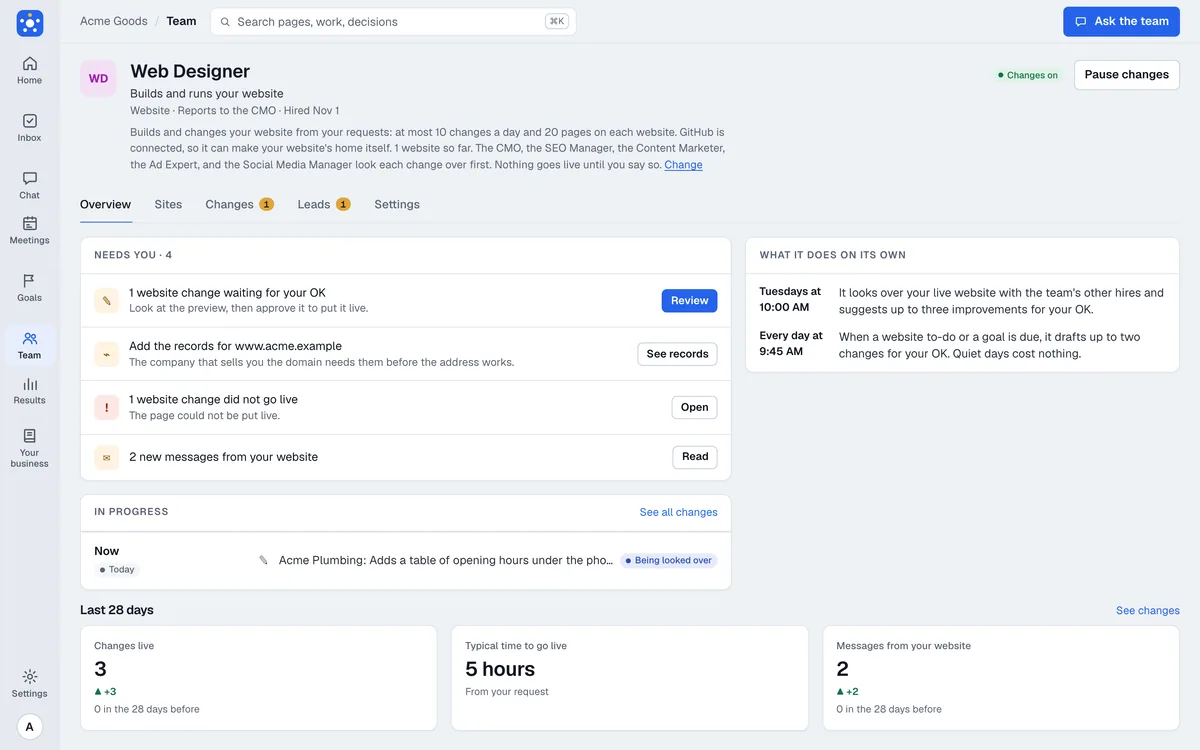
The Web Designer is the AI web designer on your Cabinet team. Ask for a page or a change, and it builds it in your own GitHub repository, shows you a preview, has your marketing team review it, and publishes only when you approve. It is built and not open to other companies yet.
Coming soon The Web Designer is built and is not open to other companies yet.
What it does
Builds a site from a request
Say what you want in any conversation. It builds a static site in a GitHub repository you own, and serves it with GitHub Pages.
Edits a site you already have
It can adopt an existing static site repository, then make changes you ask for, such as opening hours on the contact page.
Shows every change first
Each change comes with a preview. A code check on the pages runs before you see it.
Gets the team to review it
By default the CMO, the SEO Manager, and the other marketing hires review each change and say what to fix.
Sets up your own domain
It lists the records to add, and checks them with DNS before it says the domain is ready.
Takes messages from a contact form
A form on the site sends messages to your Inbox, by email, or both.
Who it works with
Reports to the CMO: CMO, Growth. Finds the cheapest way to reach customers and tests it.
On the Owner plan, which has no CMO or CTO, the hires that report to them report to the CEO instead.
Use cases
Local business with no website
A first site from a conversation
You describe the business, the Web Designer builds a few pages, and you read the preview before anything is live.
Restaurant or shop
Change the hours before the holiday
Ask for new opening hours. The change appears as a preview, and goes live when you approve it.
Service business
A contact form that reaches you
Add a form to the contact page. Messages arrive in your Inbox and by email.
Owner with a site on a builder that is hard to change
Move to a site you own
The site lives in your own GitHub repository, so you keep the files and the history.
Connects to

GitHub
The site's files live in your repository, and each change waits for your review.
On its own, and what it asks first
On its own
- Drafts a change and shows it to you with a preview
- Writes its report on how the site is doing
Asks you first
- Creating a new site, or adopting an existing one
- Publishing any change, every time
- Reverting a change that is live
- Adding or removing a custom domain
When it shows up
Every morning
Works on the changes you have asked for.
Tuesdays
Reviews the site and tells you what it would change next.
Plans
Every hire is on every plan, Trial included. You pay for the model usage it uses, not for access: each plan includes usage every month, and you can add more. It reports to the CMO, or to the CEO on the Owner plan, which has no CMO.
Questions
Can an AI design my website?
The Web Designer builds the pages from your request in a repository you own, and shows you a preview of every change. It is built and not open to other companies yet.
Will it publish changes without asking?
No. Every publish needs your approval, and a rule in the code keeps automatic publishing off.
Who owns the site?
You do. The files live in your GitHub repository and the site is served from it with GitHub Pages.
What will it cost?
The Web Designer will be on every plan like the other hires, and you pay for the usage it uses. Owner is $49 a month, Team $99, and Pro $299.
Related

CMO
Growth
Finds the cheapest way to reach customers and tests it.

SEO Manager
Organic search
Reports to the CMO
An AI SEO manager that reads Search Console, proposes fixes, and measures what they changed.
 Google Search Console
 Google Analytics
- GitHub

Content Marketer
Blog content
Reports to the CMO
An AI content marketer that plans, writes, and measures your blog posts, and publishes on your OK.
- Google Search Console
- Google Analytics
- GitHub

Nightshift
Engineer
Reports to the CTO
An AI software engineer that turns your requests into reviewed changes in your GitHub repositories.
- GitHub
Give it your website. Come back to a plan.
Questions: hello@agntwrk.com