
An AI Google Ads manager that stays inside your spending limit
Ad Expert is the AI Google Ads manager on your Cabinet team. It reads your account every morning, adjusts budgets and pauses waste within the limits you set, and asks you before it does anything those limits do not allow.
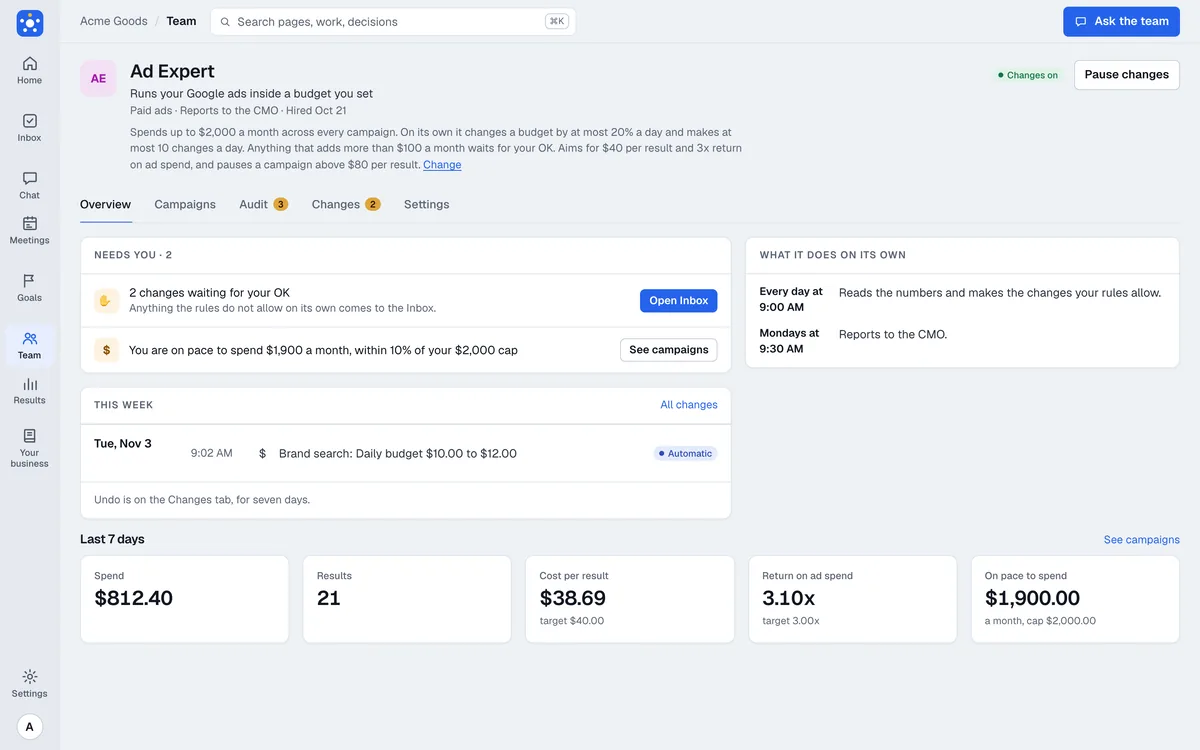
What it does
Audits your Google Ads setup
It checks conversion tracking, networks, location, ads, keywords, assets, and search terms, and lists what to fix by how much it matters.
Keeps spend under your monthly limit
It watches the pace of spend each day and holds it under the limit you set, so the month does not end with a surprise.
Adjusts budgets within your limits
It moves a daily budget by no more than the percent you allow, and no more than the number of changes a day you allow.
Pauses what is losing money
It pauses a campaign that spends with no result, or whose cost per result goes above the line you set, and logs why.
Builds Search campaigns for you to approve
It drafts a campaign and creates it paused. Turning it on is a second approval from you.
Reports every Monday
You get spend, results, cost per result, and return on ad spend, with what it changed and what it recommends next.
Who it works with
Reports to the CMO: CMO, Growth. Finds the cheapest way to reach customers and tests it.
On the Owner plan, which has no CMO or CTO, the hires that report to them report to the CEO instead.
Use cases
Local service business
Stop paying for clicks that never call
A plumber's campaign spends money on a search term with no calls. Ad Expert pauses it, notes why, and shows the change on its page so you can undo it.
Online store
A budget that follows the results
Your best campaign is under its cost target. Ad Expert raises its daily budget in small steps, never past your monthly limit.
Owner who inherited an account
A first audit without hiring a consultant
You have run ads for a year with no one checking them. Ad Expert audits the account and lists what is missing, such as a purchase conversion or sitelinks.
Agency or consultant with a few small clients
Watching an account every day
You cannot look at each account daily. Ad Expert does, reports on Mondays, and sends you only what is outside the rules.
Connects to

Google Ads
Reads campaigns, spend, and results, and makes the changes your rules allow.

Google Analytics
Optional. Adds what visitors do on your site after the click.
On its own, and what it asks first
On its own
- Reads your account and writes the daily watch and the Monday report
- Adjusts daily budgets within the percent and daily change count you set
- Pauses a campaign that wastes spend or runs above your cost limit, within the limits you set
- Reverts one of its own changes when you ask
Asks you first
- Turning a campaign on
- Creating a new campaign, and any declaration Google requires
- Any change that raises your monthly run rate by more than the amount you set
- Any proposal outside the rules, which comes to your Inbox
When it shows up
Every morning
Reads the account, checks spend against your monthly limit, and posts only if something needs attention.
Mondays
Posts the weekly report to the leadership channel.
Plans
Every hire is on every plan, Trial included. You pay for the model usage it uses, not for access: each plan includes usage every month, and you can add more. It reports to the CMO, or to the CEO on the Owner plan, which has no CMO.
Questions
Will the AI change my ads without asking?
Only small changes inside the limits you set: a budget change up to your percent, a pause for waste, and an undo of its own change. Turning on or creating a campaign, or anything that raises your monthly run rate past your limit, comes to you first.
Can it overspend my budget?
You set a monthly limit and Ad Expert keeps the daily budgets of enabled campaigns inside it. The rule is checked by code, not by the AI's judgment.
Can I stop it?
Yes. The pause switch on its page stops every automatic change at once, and its changes list shows what it did and why so you can undo it.
What does it cost?
Ad Expert is on every plan, Trial included, and you pay for the usage it uses. Owner is $49 a month, Team $99, and Pro $299, each with usage included every month.
Related

CMO
Growth
Finds the cheapest way to reach customers and tests it.

SEO Manager
Organic search
Reports to the CMO
An AI SEO manager that reads Search Console, proposes fixes, and measures what they changed.
 Google Search Console
- Google Analytics
 GitHub

Social Media Manager
Organic social
Reports to the CMO
An AI social media manager that plans and posts to X, drafts replies, and measures what each post brings.
 X
- Google Analytics

Store Manager
Ecommerce
Reports to the CEO
An AI Shopify store manager that watches sales and stock and changes only what your rules allow.
 Shopify
- Google Analytics
Give it your website. Come back to a plan.
Questions: hello@agntwrk.com